
S01E07


Hey there, and welcome back to another Tessellate.
This is a weekly-(ish) newsletter where I talk about building digital products.
So far I’ve built Dime, an invoicing app for freelancers, and Jobwatchr, which started out as a feed of jobs opened by big tech in the last 24 hours, but is now becoming a job inbox for talent seekers. More on that below!
As usual, I’ll start by recapping what happened last week and then share plans for the week ahead.
Let’s dive in! ⬇️ ⬇️ ⬇️
Progress ⚡️
Two weeks ago I had a big procrastination problem.
Last week, just like that *snaps fingers*, I was in full production mode. I wrapped up last week’s newsletter by sharing my to-do for launching Jobwatchr on Product Hunt:
Build login/signup flowLet users select companies to followLet users filter on select keywordsAbility for users to create a private feed on their own URL, e.g: jobwatchr.com/list/<unique_id>
Send job alert emails to a user as soon as a new job is opened up that matches their keywords
Feature-wise, we’re almost done. Not bad!
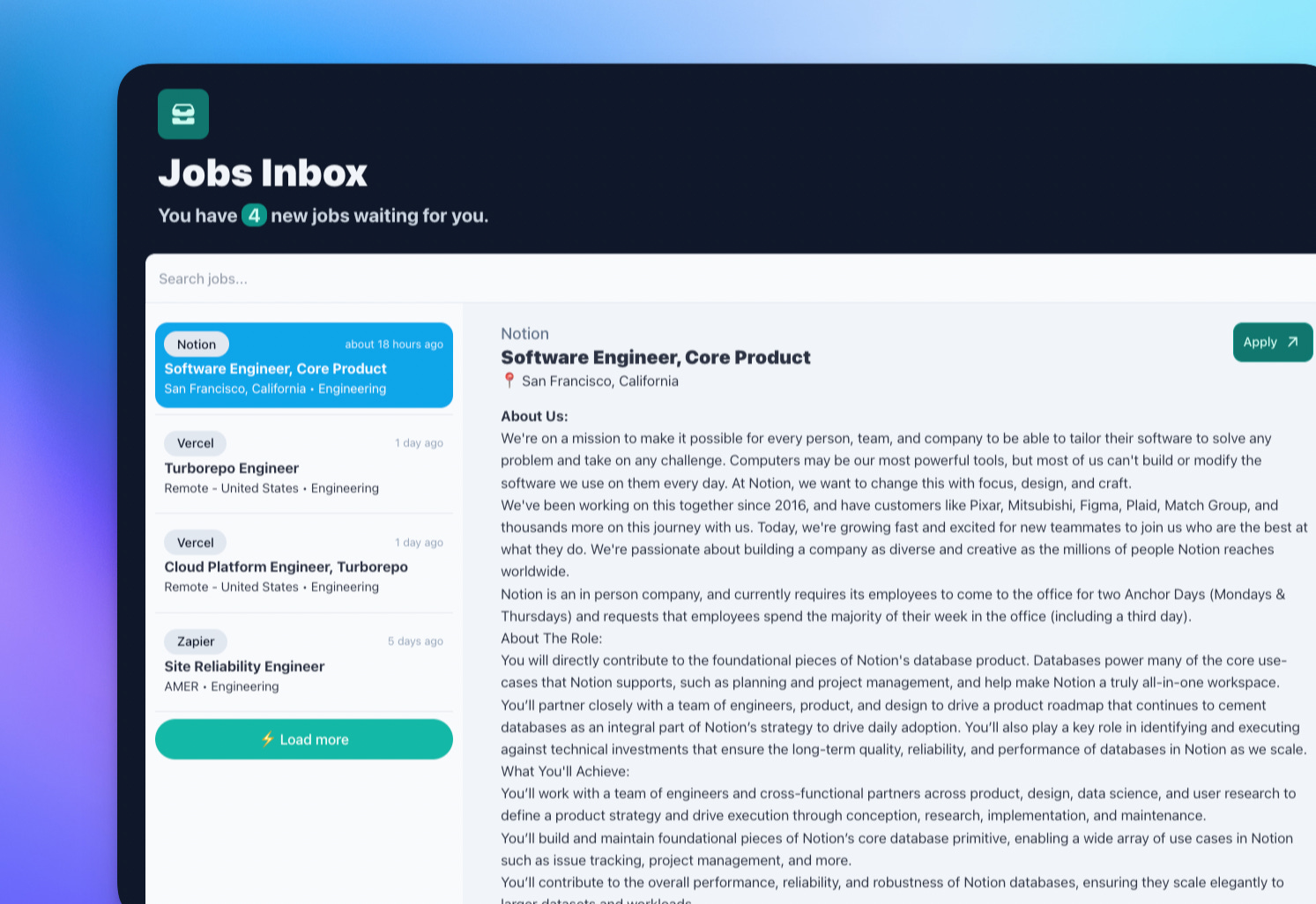
Early on in the week, I had the idea to position this new feature as a job inbox for job seekers.
You select companies you’re interested in, add a few keywords that match your preferences, and Jobwatchr will send new jobs to your inbox — within 10 minutes of the job going live.
This inbox model really clicked for me and I was able to design + build the first version of this in almost no time.


By Thursday, I was able to invite the first 30 users to try out the beta, and the waiting list has grown to 122 submissions.
From that initial batch of invites, I didn’t get much feedback. One person wrote back and only 8 people signed up. So about 27% conversion, which seems low to me given that these people explicitly signed up for the beta waiting list.
Just now I’ve sent out another 30 invites, so I’ll let you know next week how that went.
Mandatory ChatGPT sidebar 🫡
Over the weekend I started wondering how difficult it would be to implement ChatGPT’s new API.
It took me about 15 minutes to implement the API and get useful content from it. By any stretch of the imagination, that’s pretty fast.
Here’s the actual code I’m using:
 const response = await openai.createChatCompletion({
      model: "gpt-3.5-turbo",
      messages: [
        {
          role: "system",
          content:
            "Your job is to help candidates get job interviews by analyzing information from job openings and providing advice on what type of interview questions the candidate can expect. Your summary must include the job requirements and must include example interview questions. Your output should be structured in HTML. Use paragraph, list, and heading tags.",
        },
        {
          role: "user",
          content: `Here is a job opening: ${job.description}\n\n Please advise the candidate.`,
        },
      ],
    });
Even though I’m not implementing any type of chatbot, the API conceptually still works with messages. As you can see in my example, I start off by instructing it to “help candidates get job interviews by analyzing information from job openings and providing advice on what type of interview questions the candidate can expect”.
Then in the next “message”, I pass in the job description.
Here’s some side-by-side output. Original job description top, AI version bottom:
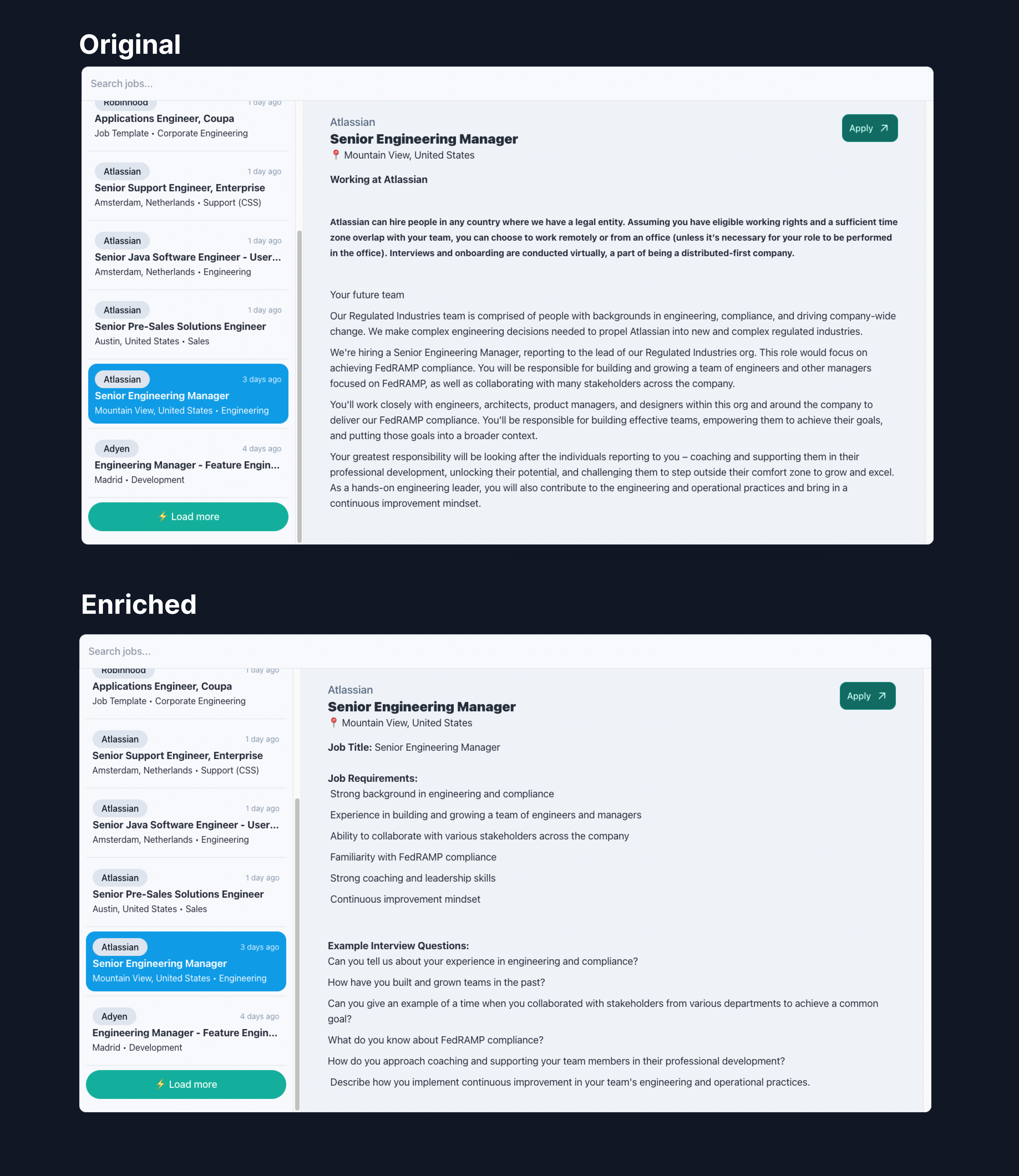
Not bad for 15 minutes of work, right? Not sure how I’ll move forward with this, but it’s something to think about!
If you’re interested in checking out the beta, reply to me here and I’ll set you up with an account!
Plans 🌱
There are basically three (there’s always more, but hey) more things for me to do:
Invite the rest of the beta waiting list users
Build the last feature: Sending job alert emails to candidates
Launch on PH
I’m not sure if I’ll meet my deadline for launching on PH this Friday. But even if I don’t, that's alright!
I’m motivated and heading in the right direction for now, and that’s the most important part.
That’s it — thanks for reading and see you next week 👋
- Toon